Welcome to Boctj.com, where we unravel the intricacies of smart home technology. As a seasoned expert with over a decade in the field, I’ve seen countless innovations, and the Feit Smart Doorbell consistently stands out as a compelling choice for homeowners seeking reliable security without breaking the bank. It’s more than just a doorbell; it’s your front-line guardian, offering peace of mind and connectivity right from your smartphone. If you’re looking to upgrade your home security with an accessible, feature-rich solution, understanding the ins and outs of the Feit smart doorbell is your first smart step.
What Makes a Feit Smart Doorbell Tick? An Overview of Models and Power Options
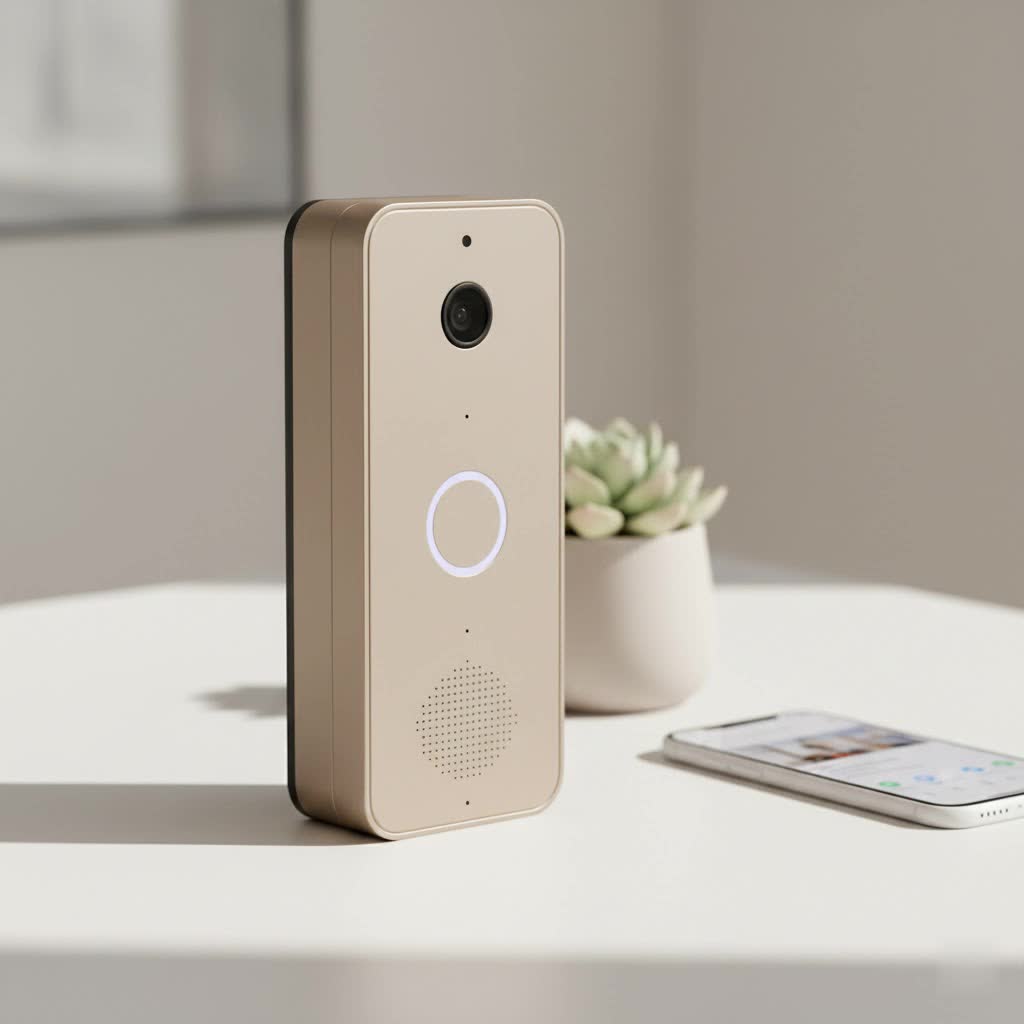
Feit Electric has made a name for itself by offering practical and efficient smart home devices, and their smart doorbells are no exception. While specific model numbers like CAM/DOOR/WIFI and CAM/DOOR/WIFI/BAT exist, the core offering revolves around a blend of essential features and flexible power options, ensuring there’s a Feit smart doorbell suitable for nearly any home setup.
You’ll typically find Feit smart doorbells available in two primary power configurations:
- Hardwired Models: These connect to your existing doorbell wiring (typically 12-24V AC). The benefit here is continuous power, meaning you never have to worry about charging a battery. This is often the preferred choice for those replacing a traditional wired doorbell.
- Battery-Powered Models: For homes without existing doorbell wiring or those seeking maximum flexibility, battery-powered Feit smart doorbells are a game-changer. Equipped with a long-lasting rechargeable battery (often around 6700mAh), they offer easier installation and can be placed almost anywhere. This also means your doorbell remains operational even during power outages.
One of the most attractive aspects of owning a Feit smart doorbell is the promise of no monthly fees. Unlike many competitors that charge for cloud storage, Feit doorbells leverage local storage via a Micro SD card (up to 128GB, sold separately), allowing you to record and review footage directly without ongoing subscription costs. This commitment to value is a key differentiator in the smart doorbell market.
Essential Features of the Feit Smart Doorbell: Beyond Just a Chime
The modern Feit smart doorbell is engineered with a suite of features designed to keep your home secure and connected. These aren’t just gadgets; they’re integral components of a comprehensive home security strategy.
Crystal Clear Vision: 1080p HD Video and Night Vision
|
Our Picks for the Best Smart Doorbell in 2026
As an Amazon Associate I earn from qualifying purchases.
|
||
| Num | Product | Action |
|---|---|---|
| 1 | Google Nest Doorbell (Wired, 3rd Gen) - 2K Video and Gemini, Live View, Night Vision, 2-Way Audio - Works with Google Home - 2025 Model - Hazel |

|
| 2 | Anti-Theft Video Doorbell Mount Compatible with Arlo Video Doorbell/Blink Doorbell Camera, Anti-Blocks Motion Sensor, Adjustable Mounting Bracket Accessories for Houses/Apartments/Rentals-Silver |
|
| 3 | 1080p Smart Video Doorbell Camera with AI Motion Detection, Night Vision, Cloud Storage, 2 Way Audio, Battery Powered, 2.4GHz Wi-Fi Only |
|
| 4 | Tapo by TP-Link Smart Video Doorbell Camera Wireless with Chime, 2K with Full Color Night Vision & Spotlights, No Monthly Fee, Ring Call, 160° Ultra-Wide View, Free AI Detection, Local Storage,D210 |
|
| 5 | Arlo Video Doorbell 2K (2nd Gen, Latest Release), Wireless or Wired Option, 2-Way Audio, Night Vision, Head to Toe Video View, Package Detection, Person & Vehicle Recognition, 1-Month Secure Plan |
|
| 6 | Google Nest Doorbell (Wired, 3rd Gen) - 2K Video and Gemini, Live View, Night Vision, 2-Way Audio - Works with Google Home - 2025 Model - Snow |
|
| 7 | ecobee Smart Video Doorbell Camera (Wired) - with Industry Leading HD Camera, Smart Security, Night Vision, Person and Package Sensors, 2-Way Talk, and Video & Snapshot Recording |
|
| 8 | 1080P Smart Wireless Video Doorbell Camera with AI Motion Detection, Night Vision, Two-Way Talk, Cloud Storage, Indoor/Outdoor Surveillance, Battery Powered, 2.4GHz Wi-Fi |
|
| 9 | Tapo TP-Link Smart Video Doorbell Camera, Chime Included, 2K 5MP, Color Night Vision, 2-Way Audio, Free AI Detection, Cloud/SD Card Storage, Works w/Alexa & Google Home, D230S1 |
|
| 10 | Tapo by TP-Link Smart Video Doorbell Camera with Chime, Battery or Wired, 2K QHD Color Night Vison, No Monthly Fee, 180° Ultra-Wide Head-to-Toe View, Ring Call, Free AI Detection, Local Storage (D225) |
|
The cornerstone of any smart doorbell is its camera, and Feit delivers with 1080p Full HD video resolution. This means you get crisp, clear images and videos, allowing you to easily identify visitors or package deliveries. Crucially, a wide 140-degree field of view ensures you capture more of your doorstep. When the sun goes down, integrated infrared (IR) night vision automatically activates, providing clear visibility up to 30 feet in low-light conditions. This feature is paramount, as many incidents unfortunately occur under the cover of darkness.
Speak and Listen: Two-Way Audio Communication
Ever miss a delivery or want to tell a solicitor you’re not interested without opening the door? The Feit smart doorbell comes equipped with built-in two-way audio. This allows you to communicate in real-time with anyone at your doorstep directly through the Feit Electric app on your smartphone, whether you’re in the backyard or across the globe. It’s a fantastic feature for managing visitors, guiding delivery drivers, or even deterring unwanted guests.
Always Alert: Advanced Motion Detection (with Human Detection)
Motion detection is a standard feature, but Feit enhances it. Your doorbell will send instant alerts to your smartphone whenever movement is detected within its field of view. To combat the annoyance of false alarms triggered by pets, passing cars, or swaying branches, many Feit models now incorporate “human detection.” This intelligent feature helps differentiate between significant events and everyday distractions, ensuring you only get notified when it truly matters. You can even adjust motion sensitivity and set specific activity zones within the app.
Your Footage, Your Control: Local Storage with No Monthly Fees
As mentioned, a major advantage of the Feit smart doorbell is its local storage capability. By inserting a Micro SD card (up to 128GB, sold separately), all recorded events—from doorbell rings to motion-activated clips—are saved directly onto the device. This eliminates the need for recurring cloud storage subscription fees, offering significant long-term savings and complete control over your data. You can access and download these recordings anytime through the Feit Electric app.
Seamless Integration: Connecting to Your Smart Home Ecosystem
A truly smart device plays well with others, and the Feit smart doorbell is designed for easy integration into your existing smart home setup. It works seamlessly with the Feit Electric app, which serves as your central control hub. Furthermore, Feit smart doorbells are compatible with popular voice assistants like Amazon Alexa and Google Assistant. This means you can use simple voice commands to view your doorbell’s live feed on compatible smart displays, bringing an extra layer of convenience to your smart home ecosystem. “As a home automation enthusiast, I always look for devices that simplify my life,” shares Benjamin Chen, a Smart Home Solutions Architect. “The Feit doorbell’s compatibility with mainstream voice assistants truly integrates it into the fabric of a modern smart home.”
Your DIY Guide to Feit Smart Doorbell Installation and Setup
Installing your Feit smart doorbell might seem daunting, but it’s generally a straightforward process that many homeowners can tackle themselves. Here’s a detailed breakdown of what to expect:
Before You Begin: Tools and Preparation
Gather your tools: typically a screwdriver, drill (if installing on brick or concrete), wire strippers (for wired models), and the hardware included in your Feit doorbell package (mounting plate, screws, anchors, angled wedge if desired, and a power kit for mechanical chimes). Ensure you have your Wi-Fi network name and password handy.
Power Down: Safety First
For wired installations, this step is critical. Locate your home’s circuit breaker and shut off the power to your existing doorbell and chime. It’s a good idea to test the old doorbell to confirm the power is off before proceeding. Safety first, always!
Mounting Your Doorbell: Wired vs. Battery Differences
- Wired Installation:
- Remove your old doorbell.
- Mark screw positions using the Feit mounting plate.
- Drill pilot holes and insert anchors if mounting on a hard surface.
- Feed your existing doorbell wires through the center hole of the mounting plate.
- Connect your existing doorbell wires to the terminals on the back of the Feit smart doorbell. It usually doesn’t matter which wire goes to which terminal. If wires are too short, use the provided extenders and terminal blocks.
- Attach the Feit doorbell to the mounting plate and secure it.
- Battery-Powered Installation:
- Choose your desired mounting location, ensuring good Wi-Fi signal.
- Mark and drill holes for the mounting bracket.
- Attach the mounting bracket to the wall.
- Insert the charged battery into the doorbell (if not already pre-installed).
- Secure the battery-powered Feit smart doorbell to its mounting bracket.
Connecting to Your Chime: Understanding the Power Kit
If you have a traditional mechanical doorbell chime, you’ll likely need to install the included “Power Kit.” This small device ensures your Feit doorbell receives consistent power and prevents your mechanical chime from buzzing or ringing unintentionally.
- Locate your existing mechanical chime box indoors.
- Remove its cover. You’ll typically see “FRONT” and “TRANS” terminals.
- Slightly loosen the screws on these terminals.
- Connect each wire from the Power Kit to one of the “FRONT” and “TRANS” screws (it doesn’t matter which wire goes where). Tighten the screws.
- Use the double-sided tape to secure the Power Kit inside the chime box, ensuring wires don’t interfere with moving parts.
- Replace the chime cover.
App-Assisted Setup: The Feit Electric App Experience
Once your Feit smart doorbell is physically installed, the magic happens in the Feit Electric app (available for iOS and Android).
- Download and open the Feit Electric app.
- Create an account or log in.
- Tap “Add Device” or the “+” sign, then select “Camera” and “Doorbell.”
- Ensure your doorbell’s indicator light is blinking rapidly (if not, press and hold the reset button until you hear a tone).
- Connect your phone to a 2.4 GHz Wi-Fi network (Feit doorbells do not support 5 GHz Wi-Fi).
- Follow the in-app instructions to pair your device, often involving scanning a QR code with the doorbell’s camera.
- Once connected, you can configure settings like motion sensitivity, notification preferences, and chime type (mechanical or none).
Feit Smart Doorbell vs. The Competition: Finding Your Perfect Match
In a crowded market dominated by giants like Ring, Nest, Arlo, and Eufy, where does the Feit smart doorbell fit in? It primarily positions itself as an excellent value-oriented option, offering a robust set of core features without the premium price tag or the commitment to monthly subscription fees that many competitors demand.
- Value Proposition: Feit often provides comparable 1080p video quality, two-way audio, and motion detection at a more accessible price point. The inclusion of local SD card storage is a significant advantage over competitors that push cloud-only subscription models.
- Ease of Use: While higher-end brands might offer more advanced AI features or tighter ecosystem integrations, Feit focuses on simplicity and straightforward functionality. Its app is user-friendly, and installation is designed for the average homeowner.
- Connectivity: The reliance on 2.4 GHz Wi-Fi is standard for many smart home devices, though some premium doorbells now support 5 GHz for potentially faster connections in busy networks.
- Power Flexibility: Offering both wired and battery options directly addresses different installation needs, a flexibility not always found across all models from a single brand like Ring or Nest.
While brands like Ring and Nest might boast a wider array of interconnected devices or more sophisticated AI analytics, the Feit smart doorbell excels for those who prioritize essential security features, local storage, and a budget-friendly, no-subscription model. It’s a fantastic choice for first-time smart doorbell owners or anyone looking to expand their smart home without overspending.
Troubleshooting Common Feit Smart Doorbell Glitches
Even the most reliable smart devices can encounter a hiccup or two. Here’s how to tackle some common issues you might face with your Feit smart doorbell:
Connectivity Conundrums: Wi-Fi Issues and Resetting Your Device
If your Feit smart doorbell goes offline or struggles to connect to the app, Wi-Fi is usually the culprit.
- Check Your Wi-Fi: Ensure your 2.4 GHz Wi-Fi network is active and strong at the doorbell’s location. Wi-Fi extenders can help if your router is far away.
- Router Reboot: Sometimes, a simple reboot of your home Wi-Fi router can resolve connectivity problems.
- Resetting the Doorbell: If all else fails, locate the reset button on your Feit doorbell (often a small pinhole). Press and hold it until you hear an audible tone and the indicator light blinks rapidly. Then, attempt to re-pair the doorbell through the Feit Electric app.
Overly Enthusiastic Alerts: Adjusting Motion Sensitivity
Some users report that their Feit doorbell’s motion detection can be quite sensitive, leading to frequent, unnecessary notifications.
- Adjust Sensitivity Settings: Within the Feit Electric app, navigate to your doorbell’s settings and find the motion detection sensitivity slider. Gradually lower it until you find a balance that captures relevant events without constant false alarms.
- Set Activity Zones: Utilize the app to define specific areas within the camera’s view where you want motion detection to be active. This can help ignore busy sidewalks or roads.
- Enable Human Detection: If available on your model, make sure “human detection” is enabled to filter out non-human movement.
Power Puzzles: Ensuring Consistent Operation
If your wired Feit smart doorbell isn’t receiving power or your battery-powered one is draining too quickly:
- Wired Models: Double-check the circuit breaker to ensure power is on. Verify that the doorbell wires are securely connected to the terminals. For mechanical chimes, ensure the Power Kit is correctly installed and not buzzing or hot to the touch, which indicates incorrect wiring.
- Battery-Powered Models: Ensure the battery is fully charged. Frequent live viewing or very high motion sensitivity settings can reduce battery life. If battery life seems unusually short, check app settings for excessive recording or notifications.
App Hiccups: Keeping Your Feit Electric App Updated
If you experience glitches within the Feit Electric app, such as slow loading, unresponsive controls, or playback issues:
- App Updates: Always ensure your Feit Electric app is updated to the latest version from your device’s app store. Developers frequently release updates to fix bugs and improve performance.
- Clear Cache/Reinstall: For persistent issues, try clearing the app’s cache or, as a last resort, uninstalling and reinstalling the app.
Frequently Asked Questions About the Feit Smart Doorbell
Q: Does the Feit smart doorbell require a subscription?
A: No, a key advantage of the Feit smart doorbell is that it does not require a monthly subscription fee. It supports local storage via a Micro SD card (up to 128GB, sold separately) for recording and reviewing footage.
Q: What Wi-Fi frequency does the Feit smart doorbell use?
A: The Feit smart doorbell connects to your home’s 2.4 GHz Wi-Fi network. It does not support 5 GHz Wi-Fi. Ensure your router is configured to broadcast a 2.4 GHz signal.
Q: Can I install a Feit smart doorbell myself?
A: Yes, many homeowners find the Feit smart doorbell straightforward to install, especially the battery-powered models. Wired installations require shutting off power at the circuit breaker and basic wiring knowledge. If you’re uncomfortable with electrical work, it’s always wise to consult a certified electrician.
Q: Is the Feit smart doorbell compatible with Alexa or Google Assistant?
A: Absolutely! The Feit smart doorbell seamlessly integrates with popular smart home platforms, including Amazon Alexa and Google Assistant, allowing for voice control and live viewing on compatible smart displays.
Q: How does the Feit smart doorbell store video footage?
A: The Feit smart doorbell stores video footage locally on a Micro SD card (up to 128GB), which you purchase separately and insert into the device. This allows you to record and review events directly through the Feit Electric app without paying for cloud storage.
Elevate Your Home Security with a Feit Smart Doorbell
Choosing a Feit smart doorbell is a smart investment in your home’s security and your peace of mind. With its crisp 1080p HD video, reliable night vision, two-way audio communication, and intelligent motion detection, you’ll always know who’s at your door, day or night. The flexible power options and, most notably, the absence of recurring monthly fees through local SD card storage, make it an incredibly attractive and cost-effective solution for modern homeowners.
From seamless installation to intuitive app control and smart home integration, the Feit smart doorbell delivers essential security features without unnecessary complexity or expense. So, why wait? Join the growing community of smart homeowners and experience the convenience and confidence that a Feit smart doorbell brings to your entryway. It’s time to upgrade your home security—the smart way.
