Gone are the days when a simple chime announced a visitor. Today, your front door can be a proactive guardian, a communication hub, and a key component of your smart home ecosystem. Welcome to the world of the smart home doorbell camera, a revolutionary device that has transformed how we interact with our front entryways and bolstered our home security in ways we once only dreamed of. If you’re looking to upgrade your peace of mind and get a clearer picture of what’s happening at your doorstep, you’ve come to the right place. As a veteran in smart home technology, I’m here to demystify everything about these incredible gadgets and show you why a smart doorbell camera isn’t just a gadget, but a necessity for the modern home.
The Heart of Home Security: What is a Smart Home Doorbell Camera?
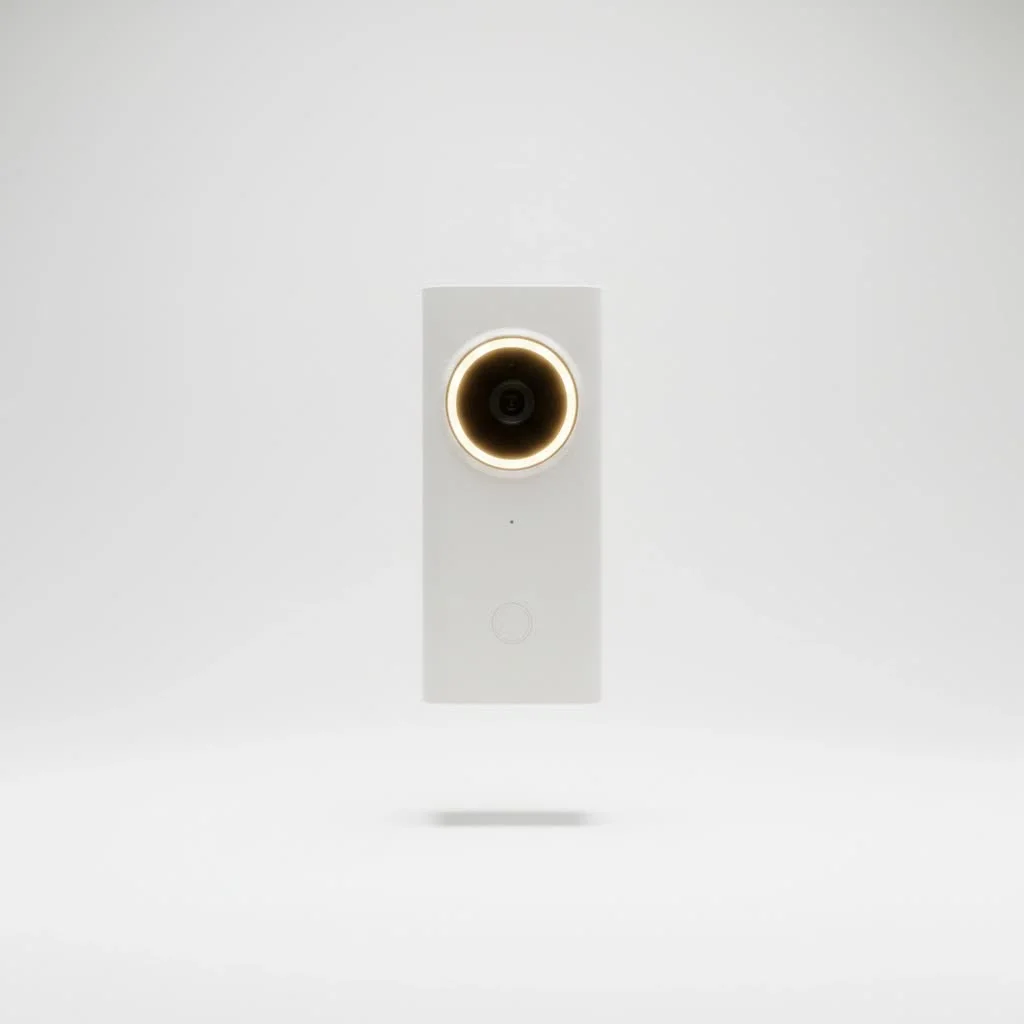
At its core, a smart home doorbell camera is exactly what it sounds like: a doorbell equipped with a camera, microphone, and speaker, all connected to your home’s Wi-Fi network. But it’s so much more than that. This isn’t just about knowing who’s at the door when you’re home; it’s about being able to see, hear, and speak to anyone, anywhere, anytime. Imagine being at work and getting a notification that a package has arrived, then seeing the delivery driver and even talking to them through your phone, all thanks to your smart doorbell camera. It’s security, convenience, and connectivity rolled into one sleek device. For more smart home guides on this site.
Why is a Smart Home Doorbell Camera Essential for Modern Living?
In our increasingly connected world, the traditional doorbell is truly outdated. A smart home doorbell camera provides unparalleled visibility and control over your front entrance. It acts as your eyes and ears, deterring potential intruders, monitoring package deliveries, and allowing you to screen visitors without ever opening the door. It’s an indispensable layer of security, offering real-time alerts and recorded footage that can be crucial in unforeseen circumstances.
Types of Smart Home Doorbell Cameras: Wired vs. Wireless
When diving into the world of smart doorbell cameras, one of the first decisions you’ll face is choosing between a wired and a wireless model. Both have their unique advantages and are suited for different home setups.
Wired Smart Doorbells
Wired smart doorbells connect to your existing doorbell wiring. This means they draw continuous power, eliminating the need for battery changes.
- Pros: Generally offer the most consistent performance, higher video quality, more advanced features, and reliable connectivity since they have a constant power source. You’ll never have to worry about a dead battery.
- Cons: Installation can be a bit more involved, often requiring some basic electrical knowledge to connect to your home’s existing low-voltage wiring and potentially a chime kit or power transformer. Not suitable for homes without existing doorbell wiring.
Wireless (Battery-Powered) Smart Doorbells
|
Our Picks for the Best Smart Doorbell in 2026
As an Amazon Associate I earn from qualifying purchases.
|
||
| Num | Product | Action |
|---|---|---|
| 1 | Google Nest Doorbell (Wired, 3rd Gen) - 2K Video and Gemini, Live View, Night Vision, 2-Way Audio - Works with Google Home - 2025 Model - Snow |

|
| 2 | 1080p Smart Video Doorbell Camera with AI Motion Detection, Night Vision, Cloud Storage, 2 Way Audio, Battery Powered, 2.4GHz Wi-Fi Only |
|
| 3 | Google Nest Doorbell (Wired, 3rd Gen) - 2K Video and Gemini, Live View, Night Vision, 2-Way Audio - Works with Google Home - 2025 Model - Hazel |
|
| 4 | ecobee Smart Video Doorbell Camera (Wired) - with Industry Leading HD Camera, Smart Security, Night Vision, Person and Package Sensors, 2-Way Talk, and Video & Snapshot Recording |
|
| 5 | Tapo TP-Link Smart Video Doorbell Camera, Chime Included, 2K 5MP, Color Night Vision, 2-Way Audio, Free AI Detection, Cloud/SD Card Storage, Works w/Alexa & Google Home, D230S1 |
|
| 6 | Arlo Video Doorbell 2K (2nd Gen, Latest Release), Wireless or Wired Option, 2-Way Audio, Night Vision, Head to Toe Video View, Package Detection, Person & Vehicle Recognition, 1-Month Secure Plan |
|
| 7 | 1080P Smart Wireless Video Doorbell Camera with AI Motion Detection, Night Vision, Two-Way Talk, Cloud Storage, Indoor/Outdoor Surveillance, Battery Powered, 2.4GHz Wi-Fi |
|
| 8 | Anti-Theft Video Doorbell Mount Compatible with Arlo Video Doorbell/Blink Doorbell Camera, Anti-Blocks Motion Sensor, Adjustable Mounting Bracket Accessories for Houses/Apartments/Rentals-Silver |
|
| 9 | Tapo by TP-Link Smart Video Doorbell Camera with Chime, Battery or Wired, 2K QHD Color Night Vison, No Monthly Fee, 180° Ultra-Wide Head-to-Toe View, Ring Call, Free AI Detection, Local Storage (D225) |
|
| 10 | Tapo by TP-Link Smart Video Doorbell Camera Wireless with Chime, 2K with Full Color Night Vision & Spotlights, No Monthly Fee, Ring Call, 160° Ultra-Wide View, Free AI Detection, Local Storage,D210 |
|
Wireless smart doorbell cameras, on the other hand, run on rechargeable batteries. They are a fantastic option for homes without existing doorbell wiring or for renters who need a less permanent solution.
- Pros: Incredibly easy to install, often just a matter of mounting it to your doorframe. Their portability and flexibility allow you to place them almost anywhere.
- Cons: Battery life needs managing, typically requiring recharging every few weeks to months, depending on usage. They might also experience slight delays in alerts or video transmission due to power saving modes.
Solar-Powered Options
Some smart doorbell cameras offer solar panel accessories or integrated solar charging, providing a hybrid solution. These can extend battery life significantly, reducing the frequency of manual recharges, making them a great choice for eco-conscious homeowners or those with ample sunlight.
Unlocking Advanced Features: What Can Your Smart Doorbell Do?
The true magic of a smart home doorbell camera lies in its impressive array of features designed to enhance security and convenience.
Crystal Clear Vision, Day or Night
Most smart doorbell cameras boast high-definition (HD) video quality, often up to 1080p or even 2K, ensuring you get a sharp, clear view of your visitors. Wide-angle lenses are standard, giving you a broad field of view, so you can see more of your porch. And of course, advanced night vision (infrared or even color night vision) ensures you don’t miss a thing, even in complete darkness.
Two-Way Audio Communication
This is a game-changer. With built-in microphones and speakers, you can talk to anyone at your door from your smartphone, no matter where you are. Whether it’s guiding a delivery driver, greeting a friend, or deterring an unexpected guest, two-way audio offers incredible control. “The ability to speak directly to someone at your door from thousands of miles away is not just convenient, it’s a fundamental shift in personal security,” says Dr. Evelyn Reed, a renowned smart home security analyst.
Intelligent Motion Detection and Alerts
Forget constant, annoying notifications. Modern smart doorbell cameras feature customizable motion detection zones, allowing you to focus on specific areas of your property. Many can even distinguish between people, animals, and packages, sending you more relevant alerts. Instant notifications directly to your phone mean you’re always in the loop.
Cloud and Local Storage Options
What good is a video if you can’t review it later? Smart doorbell cameras offer various options for storing recorded footage.
- Cloud Storage: Many brands provide subscription plans for cloud storage, giving you access to recorded events for a certain period (e.g., 30 or 60 days). This is convenient and ensures your footage is safe even if the device is tampered with.
- Local Storage: Some models include a slot for a microSD card, allowing you to store footage directly on the device, often without a monthly fee. This is a great privacy-focused option for many users.
Seamless Smart Home Integration
The “smart home” in smart home doorbell camera isn’t just for show. These devices are designed to integrate effortlessly with your broader smart home ecosystem. They can connect with voice assistants like Amazon Alexa or Google Assistant, allowing you to view your doorbell feed on smart displays or even speak to visitors through your smart speakers. Integration with smart locks means you can unlock your door remotely for trusted visitors, and linking with smart lights can automatically illuminate your porch when motion is detected.
Other Noteworthy Features
Depending on the model, you might find additional features like:
- Pre-recorded messages: Play automated responses when you can’t answer.
- Quick replies: Send canned responses with a tap.
- Facial recognition: Some high-end models can identify familiar faces and send specific alerts.
Setting Up Your Watchful Eye: Installation and Configuration
Installing a smart home doorbell camera might seem daunting, but it’s often a straightforward process. Let’s break it down.
Pre-Installation Checklist
Before you even touch a screwdriver, gather your essentials:
- Your new smart home doorbell camera and its components.
- Basic tools: Screwdriver, drill (if needed), mounting hardware.
- A strong, stable Wi-Fi connection at your front door.
- For wired models: Ensure your existing doorbell transformer meets the voltage requirements (check your manual!).
- For battery models: Charge the battery fully beforehand.
Step-by-Step Installation (General)
While specifics vary by model, here’s a general guide:
- Turn Off Power: ALWAYS start by shutting off power to your existing doorbell at the breaker box. Safety first!
- Remove Old Doorbell: Carefully disconnect and remove your old doorbell button.
- Mount the Bracket: Secure the new mounting bracket for your smart doorbell camera to the wall or doorframe.
- Connect Wiring (Wired Models): For wired models, connect the existing doorbell wires to the terminals on your new smart doorbell camera. Follow the specific wiring diagram in your device’s manual.
- Attach the Camera: Secure the smart doorbell camera to its mounting bracket.
- Restore Power: Turn the power back on at your breaker box.
- App Setup: Download the accompanying app, create an account, and follow the on-screen instructions to connect your smart doorbell camera to your Wi-Fi network.
Configuration Essentials
Once installed, configuring your smart doorbell camera correctly is key to optimal performance.
- Wi-Fi Connection: Ensure your camera has a strong, stable connection.
- Motion Settings: Adjust motion sensitivity and define specific detection zones to minimize false alerts.
- Notification Preferences: Customize how and when you receive alerts (e.g., push notifications, email).
- Privacy Zones: If available, set up privacy zones to black out areas you don’t want the camera to record (e.g., a neighbor’s window).
Leading the Pack: A Glimpse at Top Smart Doorbell Camera Brands
The market is brimming with excellent smart doorbell camera options. Here’s a quick look at some of the leading contenders:
Ring
As a market leader, Ring offers a wide range of smart doorbell cameras, from affordable battery-powered options to advanced wired models. Their ecosystem is robust, with excellent integration across all their security devices and optional professional monitoring. Ring’s user-friendly app and extensive feature set make it a popular choice for many homeowners.
Google Nest Doorbell
Google Nest doorbells are known for their sleek design and deep integration with the Google Home ecosystem. They often feature advanced AI-powered detection, including familiar face alerts and package detection, which can be incredibly useful. While some features require a Nest Aware subscription, their intelligent alerts are often worth it.
Arlo
Arlo specializes in battery-powered security cameras, and their smart doorbell cameras are no exception. They offer robust security features, excellent video quality, and reliable wireless performance. Arlo provides flexible subscription options for cloud storage and advanced features, catering to users who prioritize battery operation and an integrated Arlo security system.
Eufy
Eufy has carved out a niche by offering high-quality smart doorbell cameras with local storage options, often negating the need for monthly subscription fees. Their devices typically boast strong image quality and a focus on user privacy, making them an attractive alternative for those looking to avoid ongoing costs.
Troubleshooting Common Smart Doorbell Camera Issues
Even the best technology can occasionally hit a snag. Here are common issues and how to tackle them.
Connectivity Problems
If your smart doorbell camera frequently goes offline or experiences video delays, it’s usually a Wi-Fi issue.
- Solution: Check your Wi-Fi signal strength at the doorbell location. Consider moving your router closer or investing in a Wi-Fi extender to boost coverage. Ensure your router’s firmware is up to date.
Motion Detection Glitches
Getting too many false alarms, or worse, missing important events?
- Solution: Adjust motion sensitivity settings within the app. Refine your detection zones to exclude busy streets or swaying trees. Some models offer human-only detection to filter out pets or vehicles.
Power Issues
For wired doorbells, a lack of power usually points to the transformer or wiring. For wireless, it’s battery life.
- Solution: For wired models, check your home’s transformer voltage requirements against your doorbell’s specifications. If too low, you may need an upgrade. Ensure all wiring connections are secure. For battery models, regular charging is key; consider a solar charger if available.
App & Notification Delays
If notifications are slow or the live view takes ages to load, it could be your internet speed or app settings.
- Solution: Check your home internet speed. Make sure your smart doorbell camera app is updated and allowed to run in the background on your phone to receive instant notifications.
Frequently Asked Questions (FAQ)
Q1: How much does a smart home doorbell camera cost?
A1: The cost of a smart home doorbell camera varies widely, typically ranging from $50 for basic models to over $300 for high-end devices with advanced features like facial recognition or 2K video. Prices can also depend on whether it’s wired or wireless and the brand.
Q2: Do I need a subscription for my smart doorbell camera?
A2: Many smart doorbell cameras offer optional subscription plans for cloud video storage, advanced motion detection features, or professional monitoring. However, some brands like Eufy offer local storage options, allowing you to avoid monthly fees while still recording events.
Q3: Can smart doorbell cameras work in cold weather?
A3: Most smart doorbell cameras are designed to withstand a range of outdoor temperatures. However, extreme cold can impact the performance of battery-powered models, as battery life tends to decrease in low temperatures. Always check the operating temperature range in the product specifications.
Q4: Are smart doorbell cameras secure?
A4: Generally, yes, smart doorbell cameras are designed with security in mind. They use encryption for video streams and data storage. However, it’s crucial to use strong, unique passwords for your accounts and enable two-factor authentication to maximize your security.
Q5: What internet speed do I need for a smart doorbell camera?
A5: A reliable internet connection with an upload speed of at least 2 Mbps is generally recommended for optimal performance of a smart doorbell camera, especially for smooth live viewing and quick alert delivery. Higher speeds are beneficial, particularly if you have multiple smart devices.
Conclusion
A smart home doorbell camera is far more than just a convenience; it’s a critical component of modern home security and smart living. From seeing who’s at your door when you’re miles away to deterring potential threats with two-way audio, these devices offer unparalleled peace of mind. By understanding the different types, features, and installation nuances, you can confidently choose the perfect smart doorbell camera to guard your home and keep you connected. So, what are you waiting for? Take the leap and transform your front door into the smartest, safest entry point it can be. Your home—and your peace of mind—will thank you for it.
Smart home that does not lock you in
Free PDF — protocol compatibility matrix for 30 hubs and devices.
