Picture this: You’re miles away, enjoying a much-needed vacation, and your phone buzzes. It’s not a random notification; it’s your smart video doorbell letting you know a package just arrived or, perhaps more importantly, someone is lingering at your front door. Gone are the days of guessing who’s ringing or missing a crucial delivery. A smart video doorbell isn’t just a gadget; it’s your virtual doorman, offering unparalleled security, convenience, and peace of mind right to your fingertips. For over a decade, I’ve been immersed in the world of smart home technology, and I can tell you, this device is a game-changer for modern homes.
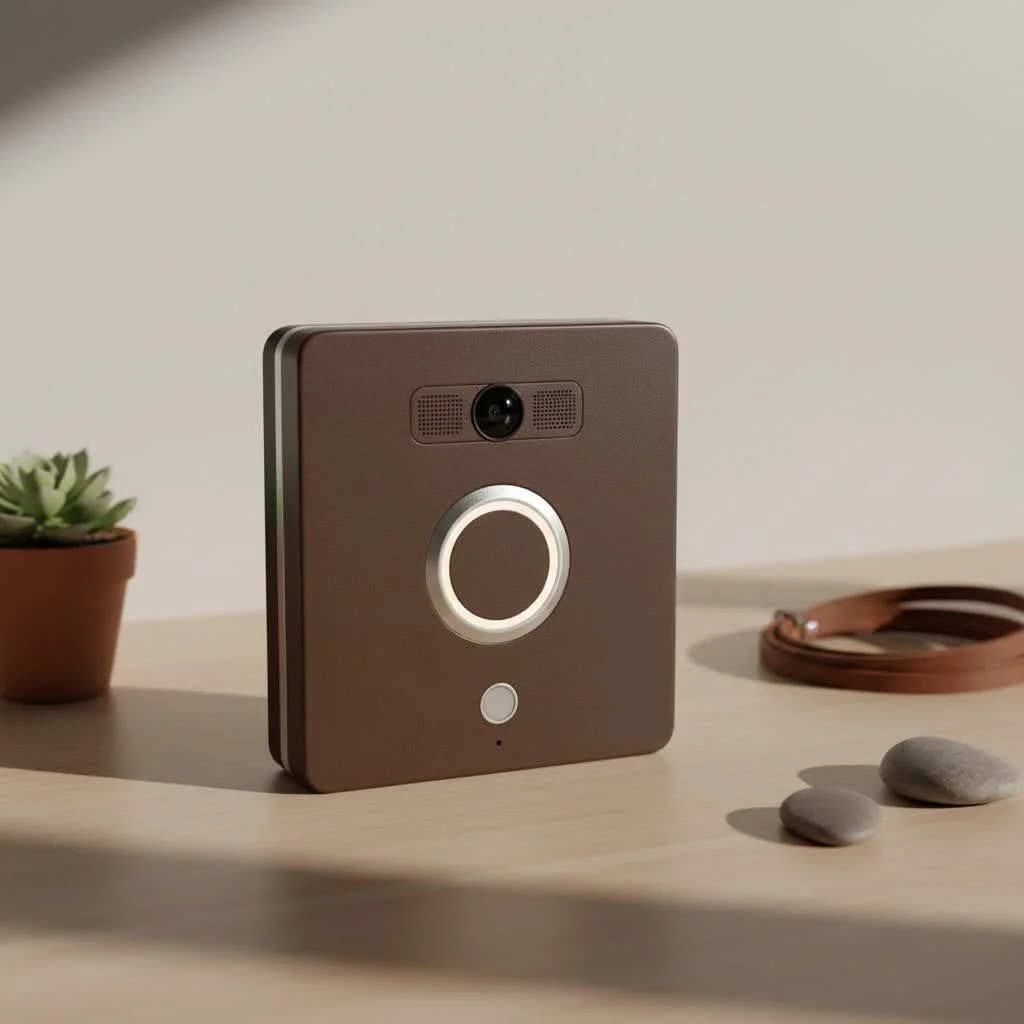
The Heart of the Home: What Exactly is a Smart Video Doorbell?
At its core, a smart video doorbell takes the traditional doorbell and infuses it with cutting-edge technology. It’s an internet-connected device, typically boasting a high-definition camera, a microphone, and a speaker, all integrated into one sleek unit. When someone presses the button or, more commonly, when its built-in motion sensors detect activity, it springs to life. Instead of just a chime, you receive an immediate alert on your smartphone or other connected devices. This allows you to see, hear, and even speak to visitors from anywhere in the world, making you feel present even when you’re not.
“A smart video doorbell acts as your home’s vigilant guardian, extending your presence and security far beyond your physical walls,” explains David Chen, a renowned smart home architect and security expert. “It’s about empowering homeowners with real-time awareness and control over their most vulnerable entry point.”
Powering Your Peace of Mind: Wired vs. Battery-Powered Smart Video Doorbells
When considering a smart video doorbell, one of the first decisions you’ll face is how it gets its juice. There are two primary power options, each with its own set of advantages and considerations:
Wired Smart Video Doorbells
These models typically connect to your home’s existing low-voltage doorbell wiring. If you already have a traditional doorbell, this can be a relatively straightforward swap.
- Pros:
- Continuous Power: No need to worry about recharging batteries; your doorbell is always on and recording.
- Reliable Performance: Consistent power often means more robust features, like continuous recording or advanced processing.
- Uses Existing Chime: Many wired models can integrate with your existing indoor chime, so you still hear a traditional “ding-dong”.
- Cons:
- Installation Complexity: Requires some basic DIY skills to handle wiring, or you might need to hire an electrician.
- Location Dependent: You’re limited to where your existing doorbell wiring is located.
Battery-Powered Smart Video Doorbells
|
Our Picks for the Best Smart Doorbell in 2026
As an Amazon Associate I earn from qualifying purchases.
|
||
| Num | Product | Action |
|---|---|---|
| 1 | Google Nest Doorbell (Wired, 3rd Gen) - 2K Video and Gemini, Live View, Night Vision, 2-Way Audio - Works with Google Home - 2025 Model - Snow |

|
| 2 | Arlo Video Doorbell 2K (2nd Gen, Latest Release), Wireless or Wired Option, 2-Way Audio, Night Vision, Head to Toe Video View, Package Detection, Person & Vehicle Recognition, 1-Month Secure Plan |
|
| 3 | Tapo by TP-Link Smart Video Doorbell Camera with Chime, Battery or Wired, 2K QHD Color Night Vison, No Monthly Fee, 180° Ultra-Wide Head-to-Toe View, Ring Call, Free AI Detection, Local Storage (D225) |
|
| 4 | 1080P Smart Wireless Video Doorbell Camera with AI Motion Detection, Night Vision, Two-Way Talk, Cloud Storage, Indoor/Outdoor Surveillance, Battery Powered, 2.4GHz Wi-Fi |
|
| 5 | Tapo by TP-Link Smart Video Doorbell Camera Wireless with Chime, 2K with Full Color Night Vision & Spotlights, No Monthly Fee, Ring Call, 160° Ultra-Wide View, Free AI Detection, Local Storage,D210 |
|
| 6 | Google Nest Doorbell (Wired, 3rd Gen) - 2K Video and Gemini, Live View, Night Vision, 2-Way Audio - Works with Google Home - 2025 Model - Hazel |
|
| 7 | 1080p Smart Video Doorbell Camera with AI Motion Detection, Night Vision, Cloud Storage, 2 Way Audio, Battery Powered, 2.4GHz Wi-Fi Only |
|
| 8 | Anti-Theft Video Doorbell Mount Compatible with Arlo Video Doorbell/Blink Doorbell Camera, Anti-Blocks Motion Sensor, Adjustable Mounting Bracket Accessories for Houses/Apartments/Rentals-Silver |
|
| 9 | ecobee Smart Video Doorbell Camera (Wired) - with Industry Leading HD Camera, Smart Security, Night Vision, Person and Package Sensors, 2-Way Talk, and Video & Snapshot Recording |
|
| 10 | Tapo TP-Link Smart Video Doorbell Camera, Chime Included, 2K 5MP, Color Night Vision, 2-Way Audio, Free AI Detection, Cloud/SD Card Storage, Works w/Alexa & Google Home, D230S1 |
|
For homes without existing doorbell wiring or those seeking maximum flexibility, battery-powered options are a fantastic choice.
- Pros:
- Easy Installation: Often involves just mounting the device with screws, making it ideal for renters or those less comfortable with electrical work.
- Flexible Placement: You can install it almost anywhere you have a strong Wi-Fi signal.
- Wire-Free Aesthetic: No visible wires, contributing to a cleaner look.
- Cons:
- Recharging Required: Batteries need to be recharged periodically, typically every 1 to 6 months depending on usage and weather conditions.
- Potentially Larger Size: To accommodate the battery, these units can sometimes be bulkier.
Many brands now offer hybrid models that can function as either wired or battery-powered, giving you the best of both worlds.
Beyond the Ring: Essential Features of a Smart Video Doorbell
Today’s smart video doorbells are packed with features designed to make your life safer and more convenient. Understanding these capabilities is key to choosing the right device for your home.
Crystal-Clear Vision: HD Video & Night Vision
You want to clearly see who’s at your door, day or night. Modern smart doorbells deliver:
- Resolution: Look for at least 1080p Full HD. Many premium models offer 2K or even 4K resolution for incredibly sharp, detailed footage.
- High Dynamic Range (HDR): This feature helps balance bright and dark areas in the image, ensuring you can see details even in challenging lighting conditions.
- Wide Field of View: Many smart doorbells offer a broad perspective, often 150° or more, to capture visitors from head to toe and even packages on the ground. Some, like the Wyze Battery Video Doorbell, offer a 150° x 150° view, virtually eliminating blind spots right at your door.
- Infrared Night Vision: Essential for clear visibility in low light or complete darkness, using infrared sensors to provide crisp images.
Talk & Listen: Two-Way Audio & Pre-recorded Responses
Imagine communicating with a delivery person while you’re at work. Two-way audio makes this possible, allowing you to speak directly through the doorbell and hear their response via your smartphone app. Some advanced models even allow you to play pre-recorded messages, perfect for quick responses when you’re busy or simply prefer not to speak directly.
Always Watching: Advanced Motion Detection
This is where smart doorbells truly shine as a security device. Motion sensors detect activity around your doorstep and send instant alerts to your phone before anyone even rings the bell.
- AI-Powered Detection: The best smart doorbells use artificial intelligence to differentiate between people, pets, and vehicles, drastically reducing annoying false alarms caused by a passing car or a scurrying animal.
- Customizable Motion Zones: You can define specific areas in the camera’s view that you want to monitor, ignoring high-traffic areas like a public sidewalk.
- Package Detection: A growing number of devices can specifically alert you when a package is delivered or, concerningly, when one is picked up.
Your Data, Your Way: Storage Options
What happens to all that video footage? Smart doorbells offer various storage solutions:
- Cloud Storage: Most common, footage is uploaded and stored on the manufacturer’s cloud servers. This typically requires a monthly or annual subscription fee, but offers easy access from anywhere.
- Local Storage: Some doorbells include a microSD card slot, allowing you to store recordings directly on the device within your home. This often means no monthly fees and greater privacy, but local storage capacity is finite, and footage might be overwritten. Brands like Eufy and Wyze offer excellent subscription-free local storage options.
Seamless Integration: Smart Home Ecosystems
A smart video doorbell is rarely a standalone device. Many seamlessly integrate with popular smart home platforms like Amazon Alexa, Google Assistant, and Apple HomeKit. This allows for cool automations, such as your smart lights turning on when motion is detected at the doorbell, or viewing your doorbell feed on a smart display like a Google Nest Hub. Some even allow remote unlocking of a smart lock if a trusted visitor is identified.
Built to Last: Weather Resistance
Your doorbell lives outdoors, so it needs to withstand the elements. Most modern smart video doorbells are designed to be weather-resistant, operating reliably in a range of temperatures and conditions.
Setting Up for Success: Installing Your Smart Video Doorbell
Installing a smart video doorbell might seem daunting, but many are designed for DIY installation. Here’s a general overview:
Pre-Installation Checklist:
- Check Compatibility: For wired models, ensure your existing doorbell system (voltage, chime type) is compatible.
- Strong Wi-Fi Signal: Test your Wi-Fi strength at the doorbell’s intended location. A weak signal can lead to choppy video or disconnections. Consider a Wi-Fi extender if needed.
- Gather Tools: You’ll typically need a drill, screwdriver, and possibly needle-nose pliers.
Step-by-Step Installation (General):
- Power Off: Crucially, disconnect power to your existing doorbell at the breaker.
- Remove Old Doorbell: Carefully unscrew and detach your old doorbell, ensuring wires don’t slip back into the wall for wired models.
- Charge Battery (if applicable): For battery-powered models, fully charge the battery before installation.
- Mounting Bracket: Secure the provided mounting bracket to your wall. Use the template to mark drill holes and insert wall anchors if necessary. Some kits include a corner wedge to optimize viewing angles.
- Wiring (if applicable): Connect your existing doorbell wires to the terminals on the new doorbell’s mounting bracket. Polarity usually doesn’t matter.
- Attach Doorbell: Mount the smart video doorbell onto the bracket and secure it with the included screws.
- Power On & App Setup: Restore power, then download the manufacturer’s app. Follow the in-app instructions to connect your doorbell to your Wi-Fi network and complete the setup process.
While many installations are straightforward, don’t hesitate to consult your device’s specific manual or call a professional if you encounter any difficulties, especially with electrical wiring.
Making the Smart Choice: How to Pick the Best Smart Video Doorbell for Your Home
Choosing the “best” smart video doorbell really depends on your specific needs and priorities. Here’s what to consider:
- Budget: Smart video doorbells range from under $100 to over $250. Factor in not just the upfront cost but also potential subscription fees.
- Power Preference: Do you prefer the set-it-and-forget-it nature of a wired connection or the easy installation of a battery-powered device?
- Must-Have Features: Prioritize features like video resolution, AI detection, two-way audio, and specific smart home integrations.
- Existing Smart Home Ecosystem: If you’re already invested in Alexa, Google Home, or Apple HomeKit, choose a doorbell that integrates seamlessly with your current setup.
- Subscription Model: Decide if you’re comfortable with recurring monthly fees for cloud storage and advanced features, or if a subscription-free model with local storage is a higher priority.
- Brand Reputation & Privacy: Stick with reputable brands known for reliability and robust data security practices, including strong encryption and two-factor authentication. Read the fine print on how companies handle your data.
Leading the Pack: Top Smart Video Doorbell Brands (2025 Insights)
The market for smart video doorbells is thriving, with several brands consistently delivering innovative and reliable products:
- Ring: A pioneer in the field, Ring offers a wide variety of wired and battery-powered options. Their Pro 2 model is lauded for 4K clarity and advanced radar motion detection, integrating seamlessly with Alexa.
- Google Nest: Known for intelligent alerts and sleek design, Nest doorbells (available in both wired and battery versions) offer excellent integration for Google Home users, with features like familiar face recognition.
- Arlo: The Arlo Video Doorbell (2nd Gen) is a versatile choice, offering sharp 2K video, battery or hardwired options, and broad smart home compatibility.
- Eufy: A strong contender for those seeking no monthly fees, Eufy doorbells often feature local storage and advanced AI detection, with models like the Eufy Video Doorbell Dual offering dual cameras for comprehensive package monitoring.
- Wyze: For budget-conscious buyers, the Wyze Video Doorbell v2 offers impressive 2K resolution and local recording without a subscription, providing great value.
- Ecobee: Known for their smart thermostats, Ecobee also offers a Smart Doorbell Camera that integrates well within their ecosystem and supports HomeKit.
- Tapo (TP-Link): Offers feature-rich doorbells at competitive prices, often with 2K video and local storage options.
Troubleshooting Common Smart Video Doorbell Hiccups
Even the best technology can have its moments. Here are a few common issues and quick fixes:
- Wi-Fi Connectivity Issues: Ensure your router is close enough to the doorbell, or consider a Wi-Fi extender. Test your internet speed at the doorbell location.
- Frequent False Alerts: Adjust your motion detection sensitivity settings within the app. Utilize customizable motion zones to exclude busy public areas. AI detection also significantly reduces these.
- Short Battery Life: If your battery-powered doorbell is draining quickly, it might be due to high motion activity, very cold weather, or a weak Wi-Fi signal forcing the device to work harder. Try adjusting motion settings or relocating your router.
- App Connectivity Problems: Ensure your app is updated to the latest version. Sometimes, simply restarting your smartphone or the doorbell itself can resolve minor glitches.
FAQ
Q1: Do all smart video doorbells require a subscription?
A1: No, not all smart video doorbells require a subscription. While many brands offer subscription plans for cloud storage and advanced AI features, several, like those from Eufy and Wyze, provide local storage options that allow you to record and review footage without recurring monthly fees.
Q2: Can a smart video doorbell replace a security camera?
A2: A smart video doorbell significantly enhances home security, but it typically doesn’t fully replace a dedicated security camera. While it provides excellent coverage of your front entrance, its fixed position might limit its field of view compared to a strategically placed security camera covering broader areas like your garage or side yard.
Q3: How long does a battery-powered smart video doorbell last?
A3: The battery life of a wireless smart video doorbell varies, typically lasting between one to six months on a single charge. Factors such as motion detection frequency, live view usage, two-way audio conversations, and extreme weather conditions can all impact how often the battery needs recharging.
Q4: What’s the ideal mounting height for a smart video doorbell?
A4: Most manufacturers recommend mounting a smart video doorbell at least 5 feet (around 1.5 meters) above the ground. This height usually provides the best angle of view to capture visitors’ faces clearly and optimize motion detection performance, including seeing packages on the ground.
Q5: Are smart video doorbells secure against hacking?
A5: Reputable smart video doorbell brands prioritize security, implementing measures like end-to-end video encryption and two-factor authentication to protect your data. However, like any internet-connected device, security is an ongoing concern. It’s crucial to choose well-known brands and maintain strong, unique passwords to safeguard your device.
Conclusion
Upgrading to a smart video doorbell is more than just a home improvement; it’s an investment in your peace of mind and the enhanced security of your home. From crystal-clear video and two-way audio to intelligent motion detection and seamless smart home integration, these devices transform your entryway into a vigilant guardian. Whether you choose a wired model for constant power or a battery-powered one for effortless installation, the right smart video doorbell empowers you to always know who’s at your door, no matter where you are. So go ahead, explore the options, and take the first step towards a smarter, more secure home. You’ll wonder how you ever managed without it!
Smart home that does not lock you in
Free PDF — protocol compatibility matrix for 30 hubs and devices.
