The Merkury Smart Doorbell is a budget-friendly smart home security device offering 1080p HD video, two-way audio, and motion detection, typically costing under $50. It provides essential features for monitoring your doorstep and communicating with visitors directly from your smartphone via the Merkury Smart or Geeni app. This device is an excellent entry point for homeowners seeking basic smart security without a significant financial investment.
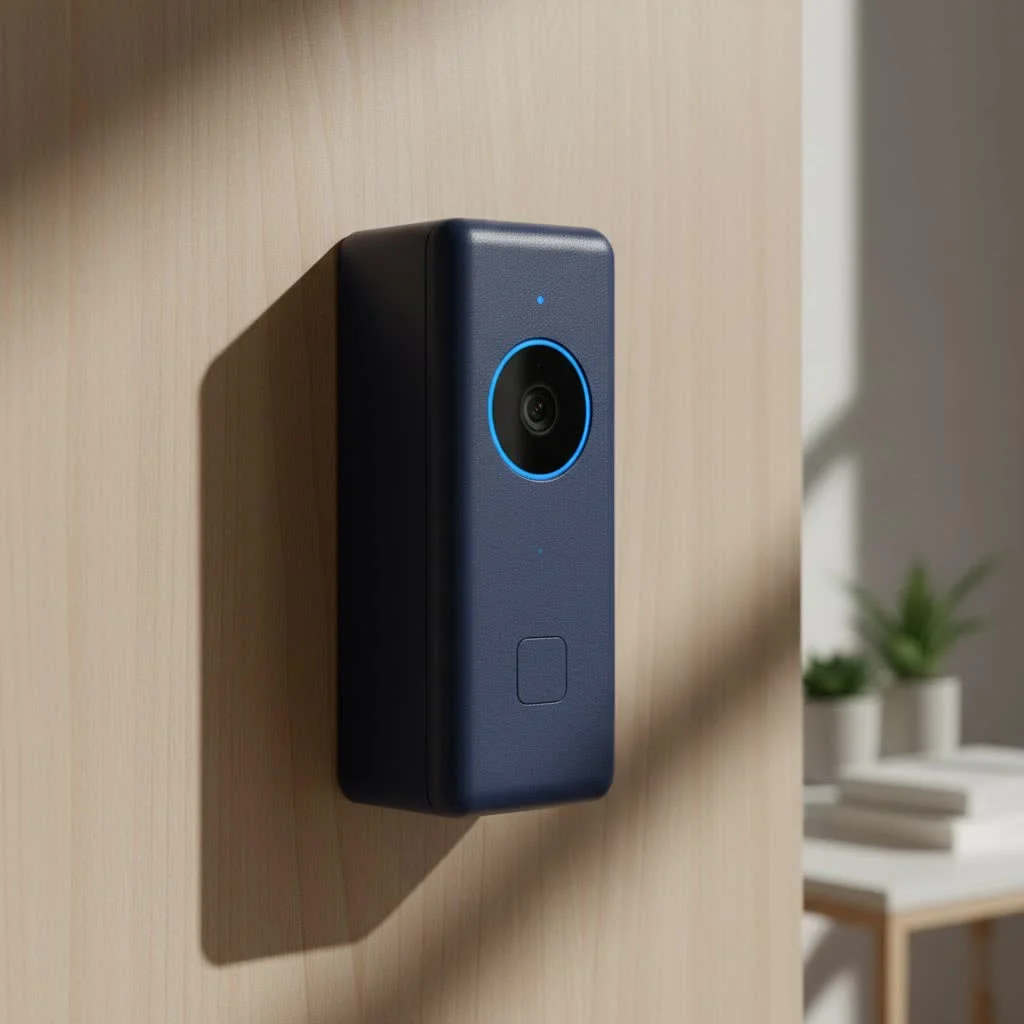
This article provides a comprehensive review of the Merkury Smart Doorbell, exploring its features, guiding you through the setup process, addressing common challenges, and helping you determine if it’s the right smart guardian for your home.
What Exactly is a Merkury Smart Doorbell?
The Merkury Smart Doorbell, often sold under the Merkury Innovations or Geeni brand, is an accessible smart home security device designed to upgrade traditional doorbells. It offers a live video feed, two-way communication, and motion alerts directly to your smartphone, allowing you to see and speak to visitors from anywhere. Merkury aims to make smart security features, such as remote monitoring and package delivery alerts, available to a broader audience by offering them at a competitive price point. It operates using your existing home 2.4 GHz Wi-Fi network and a dedicated app.
Diving Deep into Merkury Smart Doorbell Features
Despite its attractive price, the Merkury Smart Doorbell includes a range of features designed to enhance home security. Here’s a closer look at what you can expect:
Crystal-Clear Vision, Day and Night
The Merkury Smart Doorbell typically features 1080p HD resolution, providing clear and detailed video of visitors for easy identification. Most models also include automatic night vision, ensuring continuous monitoring even in low-light or complete darkness. Some versions offer wide-angle lenses to capture a broader view of your porch and detect packages on the ground.
Two-Way Talk: Connect from Anywhere
With integrated two-way audio, the Merkury Smart Doorbell allows you to speak and listen to anyone at your door in real-time through the Merkury Smart App. This feature is useful for directing delivery drivers or interacting with visitors without opening your door. Some models even provide quick preset responses for convenience.
Smart Motion Detection & Alerts
Beyond just ringing the bell, the Merkury Smart Doorbell’s motion detection capabilities are crucial for proactive security. It uses motion sensors to detect activity near your doorstep, sending instant alerts to your smartphone. This helps monitor unexpected visitors, package deliveries, or suspicious activity. Many devices allow customization of motion zones to reduce false alarms from passing cars or swaying trees, providing more relevant notifications.
Flexible Storage Options: Local or Cloud?
|
Our Picks for the Best Smart Doorbell in 2026
As an Amazon Associate I earn from qualifying purchases.
|
||
| Num | Product | Action |
|---|---|---|
| 1 | ecobee Smart Video Doorbell Camera (Wired) - with Industry Leading HD Camera, Smart Security, Night Vision, Person and Package Sensors, 2-Way Talk, and Video & Snapshot Recording |

|
| 2 | Tapo by TP-Link Smart Video Doorbell Camera with Chime, Battery or Wired, 2K QHD Color Night Vison, No Monthly Fee, 180° Ultra-Wide Head-to-Toe View, Ring Call, Free AI Detection, Local Storage (D225) |
|
| 3 | Google Nest Doorbell (Wired, 3rd Gen) - 2K Video and Gemini, Live View, Night Vision, 2-Way Audio - Works with Google Home - 2025 Model - Snow |
|
| 4 | 1080p Smart Video Doorbell Camera with AI Motion Detection, Night Vision, Cloud Storage, 2 Way Audio, Battery Powered, 2.4GHz Wi-Fi Only |
|
| 5 | Tapo TP-Link Smart Video Doorbell Camera, Chime Included, 2K 5MP, Color Night Vision, 2-Way Audio, Free AI Detection, Cloud/SD Card Storage, Works w/Alexa & Google Home, D230S1 |
|
| 6 | Arlo Video Doorbell 2K (2nd Gen, Latest Release), Wireless or Wired Option, 2-Way Audio, Night Vision, Head to Toe Video View, Package Detection, Person & Vehicle Recognition, 1-Month Secure Plan |
|
| 7 | Google Nest Doorbell (Wired, 3rd Gen) - 2K Video and Gemini, Live View, Night Vision, 2-Way Audio - Works with Google Home - 2025 Model - Hazel |
|
| 8 | Anti-Theft Video Doorbell Mount Compatible with Arlo Video Doorbell/Blink Doorbell Camera, Anti-Blocks Motion Sensor, Adjustable Mounting Bracket Accessories for Houses/Apartments/Rentals-Silver |
|
| 9 | Tapo by TP-Link Smart Video Doorbell Camera Wireless with Chime, 2K with Full Color Night Vision & Spotlights, No Monthly Fee, Ring Call, 160° Ultra-Wide View, Free AI Detection, Local Storage,D210 |
|
| 10 | 1080P Smart Wireless Video Doorbell Camera with AI Motion Detection, Night Vision, Two-Way Talk, Cloud Storage, Indoor/Outdoor Surveillance, Battery Powered, 2.4GHz Wi-Fi |
|
For video footage storage, the Merkury Smart Doorbell offers flexibility. Many models include a microSD card slot, supporting cards up to 128GB for local storage without a subscription fee. This is a significant benefit for budget-conscious users. For off-site backup and extended video history, optional cloud storage plans are available through the app, offering an additional layer of security.
Seamless Smart Home Integration
The Merkury Smart Doorbell integrates with popular smart home ecosystems like Amazon Alexa and Google Assistant. This compatibility allows you to view the doorbell’s live feed on compatible smart displays or use voice commands for interaction, adding convenience to your daily routine.
Connectivity Essentials: 2.4 GHz Wi-Fi is Key
A critical technical specification is that the Merkury Smart Doorbell requires a 2.4 GHz Wi-Fi network. While many modern routers support both 2.4 GHz and 5 GHz bands, the doorbell typically only supports the former. This ensures stable connectivity, as the 2.4 GHz band offers better range and penetration through walls, which is ideal for outdoor devices. “Understanding your home’s Wi-Fi capabilities is the first step to a smooth smart doorbell experience,” notes Marcus Thorne, Chief Innovation Officer at Boctj.com.
Merkury Smart Doorbell Installation: A DIY-Friendly Guide
The Merkury Smart Doorbell is designed for relatively straightforward installation, accessible even for DIY enthusiasts. Proper preparation is key for a smooth setup.
Before You Begin: What You’ll Need
Before starting, ensure you have:
- Your Merkury Smart Doorbell package (doorbell, mounting brackets, screws, anchors, user manual).
- A drill and drill bits (if mounting to a wall).
- A screwdriver.
- Your smartphone with the Merkury Smart App (or Geeni app) downloaded.
- Your 2.4 GHz Wi-Fi network name and password.
Wired vs. Wire-Free: Choosing Your Path
Merkury offers both wired and wire-free (battery-powered) versions:
- Wired Models: These connect to existing doorbell wiring (requiring 16-24 VAC), providing continuous power and often integrating with existing chimes.
- Wire-Free (Battery) Models: Ideal for homes without existing wiring, these run on a rechargeable battery and typically include a separate wireless indoor chime.
Step-by-Step Installation (General)
While specific steps may vary, the general installation process includes:
- Turn Off Power (for wired installations): Crucially, locate your doorbell’s circuit breaker and turn off the power to prevent electrical shock. Skip this for wire-free models.
- Mount the Bracket: Select a flat or angled mounting bracket for the best viewing angle. Mark drill holes, pre-drill if needed, and secure the bracket to the wall with screws and anchors.
- Connect Wires (for wired installations): Connect your home’s existing doorbell wires to the terminals on the back of the Merkury Smart Doorbell. Secure them tightly.
- Attach Doorbell Camera: Align the Merkury Smart Doorbell camera with the mounted bracket and slide it into place until it securely clicks.
- Restore Power (for wired installations): Turn the power back on at your circuit breaker. The doorbell camera should power on, indicated by a flashing light.
App Setup: Bringing It to Life with the Merkury Smart App
After physical installation, complete the digital setup:
- Download the App: Download the “Merkury Smart” or “Geeni” app from your smartphone’s app store (iOS or Android).
- Create Account: Open the app and create a new account or log in.
- Add Device: Tap “Add Device” or the “+” icon, then select “Smart Doorbell.”
- Connect to Wi-Fi: Follow on-screen instructions to connect your phone to your 2.4 GHz Wi-Fi network and enter its password into the app.
- Scan QR Code: The app will generate a QR code. Hold your phone’s screen in front of the Merkury Smart Doorbell camera until you hear a confirmation beep.
- Complete Pairing: Confirm the sound in the app; the doorbell should connect and its indicator light will turn solid. Name your doorbell and customize settings.
Living with a Merkury Smart Doorbell: User Experience and Performance
Daily use of a Merkury Smart Doorbell reveals its strengths and some limitations compared to pricier alternatives.
The Good Stuff
- Affordability: The Merkury Smart Doorbell offers excellent value, providing essential smart features without a high investment.
- Clear Picture Quality: The 1080p video is generally clear for identifying visitors, and night vision is effective.
- Easy App Use: The Merkury Smart (or Geeni) app is user-friendly, making it easy to navigate live views, review recordings, and adjust settings.
- Local Storage Option: The ability to use a microSD card for recording without a mandatory subscription is a significant advantage.
- Sleek Design: Its modern, compact design blends well with most home exteriors.
Navigating the Niggles
Common points of contention with the Merkury Smart Doorbell include:
- Battery Life Concerns (for wire-free models): Some users report rapid battery drain, requiring recharging as frequently as once a week, especially with high motion activity or frequent live viewing.
- Connectivity Quirks: Intermittent connectivity issues or drops may occur, sometimes requiring resets or repositioning of the Wi-Fi router.
- Notification Delays: There can be a noticeable delay between an event (motion detection or doorbell press) and receiving the smartphone notification.
- Potential Lag in Video/Audio: Live video streams or two-way audio may experience slight lag, which can be frustrating during real-time interactions.
“It’s a classic trade-off,” says Marcus Thorne from Boctj.com. “You get impressive features for the price, but sometimes that means a less polished experience in areas like battery longevity or seamless connectivity compared to devices costing three or four times as much. Setting realistic expectations is key.”
Troubleshooting Common Merkury Smart Doorbell Issues
Even reliable smart devices can encounter problems. Here are solutions for common Merkury Smart Doorbell issues:
“My Doorbell Won’t Connect to Wi-Fi!”
This issue is usually related to the Wi-Fi band.
- Check Your Wi-Fi: Ensure your home network broadcasts a 2.4 GHz signal, as the Merkury Smart Doorbell does not support 5 GHz Wi-Fi.
- Password Accuracy: Double-check your Wi-Fi password for typos.
- Proximity: Temporarily move your doorbell closer to your Wi-Fi router, or use a Wi-Fi extender if the signal is weak at your door.
- Reset the Device: As a last resort, perform a factory reset (press a reset button for 10 seconds) and retry the pairing process.
“Why is the Battery Draining So Fast?”
For wire-free Merkury Smart Doorbells, rapid battery drain is a frequent concern.
- Motion Sensitivity: High motion sensitivity settings trigger constant recordings and alerts, rapidly depleting the battery. Reduce sensitivity or customize motion zones to focus on critical areas.
- Live View Frequency: Regularly checking the live view consumes battery power. Limit unnecessary live streaming.
- Signal Strength: A weak Wi-Fi signal forces the doorbell to work harder, consuming more power. Improve Wi-Fi signal strength if possible.
“Notifications Are Delayed or Missing.”
- App Settings: Verify that notifications are enabled for the Merkury Smart App in your phone’s system settings and within the app itself. Check for “do not disturb” modes.
- Wi-Fi Connection: A strong and stable 2.4 GHz Wi-Fi connection is crucial for timely notifications.
- Firmware Updates: Ensure your doorbell’s firmware and the app are up to date, as updates often include performance improvements.
“Video or Audio is Lagging.”
- Wi-Fi Signal: A strong 2.4 GHz Wi-Fi signal is paramount for smooth video and audio. Distance from the router or interference can cause lag.
- Internet Speed: Ensure your overall home internet speed is sufficient for streaming.
- App Restart: Try closing and reopening the Merkury Smart App.
Merkury Smart Doorbell vs. The Competition: Is It Right for You?
Compared to premium brands like Ring or Nest, the Merkury Smart Doorbell typically offers fewer advanced features, less polished software, and often struggles with battery life in its wire-free versions. However, its significant advantage is its price point, making it ideal for specific users:
- The Budget-Conscious Homeowner: If you need essential smart doorbell features (video, two-way audio, motion alerts) without high upfront costs or mandatory subscriptions, the Merkury Smart Doorbell is a strong contender.
- The First-Time Smart Doorbell Buyer: It’s an excellent way to experience smart home security before investing in a more expensive system.
- Renters or Those with Simple Needs: Its ease of installation, particularly the wire-free option, makes it suitable for situations where complex wiring is not feasible or desired.
If you require modern AI features, seamless integration with a vast smart home ecosystem, or flawless performance in every scenario, higher-priced alternatives might be necessary. But for solid basic functionality at an unbeatable price, the Merkury Smart Doorbell is a great choice.
Frequently Asked Questions (FAQ)
Q: Does the Merkury Smart Doorbell require a subscription?
A: No, a subscription is not strictly required. Many Merkury Smart Doorbell models support local storage via a microSD card (up to 128GB), allowing you to record and review footage without monthly fees. Optional cloud storage plans are typically available if you desire off-site backup and extended video history.
Q: Is the Merkury Smart Doorbell waterproof?
A: Most Merkury Smart Doorbell cameras are designed for outdoor use and are weatherproof, meaning they can withstand various weather conditions like rain and snow. However, like any outdoor electronic device, extreme prolonged exposure to harsh elements should be mitigated where possible for longevity.
Q: Can I connect it to my existing chime?
A: For wired Merkury Smart Doorbell models, they are often designed to work with your existing mechanical chime (typically requiring 16-24VAC power). Wire-free (battery) models often come with their own wireless indoor chime, as they don’t connect to existing doorbell wiring.
Q: What Wi-Fi frequency does the Merkury Smart Doorbell use?
A: The Merkury Smart Doorbell typically connects to your home’s 2.4 GHz Wi-Fi network. It is generally not compatible with 5 GHz Wi-Fi networks, so ensure your router is broadcasting on the 2.4 GHz band during setup.
Q: How do I reset my Merkury Smart Doorbell?
A: To reset your Merkury Smart Doorbell, you usually need to locate a small reset button (often found on the back or side of the device, sometimes requiring a pin to press). Press and hold this button for about 10 seconds until the indicator light begins to flash, signaling that the device is in pairing mode and ready to be set up again.
Final Thoughts: Securing Your Home Smartly
The Merkury Smart Doorbell is a compelling option for enhancing home security without a significant financial outlay. It delivers on core smart doorbell promises: clear video, two-way audio, and motion detection, all accessible from your smartphone. While some users might face challenges with battery life on wire-free models or occasional connectivity quirks, these are often manageable with proper setup and realistic expectations.
The Merkury Smart Doorbell provides solid, accessible smart security for everyday homes. If you’re a first-time smart doorbell owner or a budget-conscious consumer seeking practical functionality, the Merkury Smart Doorbell could be the intelligent guardian your home needs. It’s a smart step towards a more connected and secure living space.
Frequently Asked Questions
Does the Merkury Smart Doorbell require a subscription to function?
No, a subscription is not strictly required for the Merkury Smart Doorbell. Many models support local storage via a microSD card, allowing you to record and review up to 128GB of footage without monthly fees. Optional cloud storage plans are available for off-site backup and extended video history if desired.
Is the Merkury Smart Doorbell designed to withstand outdoor weather conditions?
Yes, most Merkury Smart Doorbell cameras are designed for outdoor use and are weatherproof, meaning they can withstand various conditions like rain and snow. However, to ensure longevity, it's advisable to mitigate extreme or prolonged exposure to harsh elements where possible.
Can the Merkury Smart Doorbell connect to an existing mechanical chime?
Wired Merkury Smart Doorbell models are often designed to work with your existing mechanical chime, typically requiring 16-24VAC power. Wire-free (battery) models, however, usually come with their own wireless indoor chime and do not connect to existing doorbell wiring.
What type of Wi-Fi network is compatible with the Merkury Smart Doorbell?
The Merkury Smart Doorbell typically connects to your home's 2.4 GHz Wi-Fi network. It is generally not compatible with 5 GHz Wi-Fi networks, so it's crucial to ensure your router is broadcasting on the 2.4 GHz band during the setup process for successful connection.
How do I perform a factory reset on my Merkury Smart Doorbell device?
To reset your Merkury Smart Doorbell, locate the small reset button, often on the back or side of the device (sometimes requiring a pin). Press and hold this button for approximately 10 seconds until the indicator light begins to flash, which signals that the device is in pairing mode and ready for a new setup.
Smart home that does not lock you in
Free PDF — protocol compatibility matrix for 30 hubs and devices.
I was looking for something affordable to keep an eye on packages and this Merkury Smart Doorbell totally fits the bill. The 1080p HD video is surprisingly clear for the price point, and I can easily check my front door from work. Setup was pretty straightforward, which was a relief since I’m not super tech-savvy.
This is my first smart home device and I’m really impressed with the Merkury Smart Doorbell. Being able to use the Geeni app to see who’s at the door is super convenient, especially when I’m not home. It gives me peace of mind without breaking the bank, which was my main concern.
I needed a basic smart doorbell for my apartment and the Merkury one has been great. The two-way audio is clear and it connects easily to my phone. For the price, you really can’t beat the essential features it offers for monitoring your doorstep.
It’s a decent doorbell for under $50, but I’ve had a few issues with the motion detection being a bit too sensitive, even after adjusting the settings. I get a lot of alerts for cars driving by, which can be annoying. The two-way audio works well though, and it’s nice to talk to delivery drivers.