The Mubview Smart Video Doorbell offers robust, subscription-free home security with features like 2K HD video, intelligent motion detection, and versatile storage options, making it a cost-effective alternative to systems with recurring fees. It provides clear visuals and smart alerts without tying users to monthly payments, enhancing home protection with hassle-free operation.
What Makes a Smart Doorbell “Smart”? Understanding the Essentials
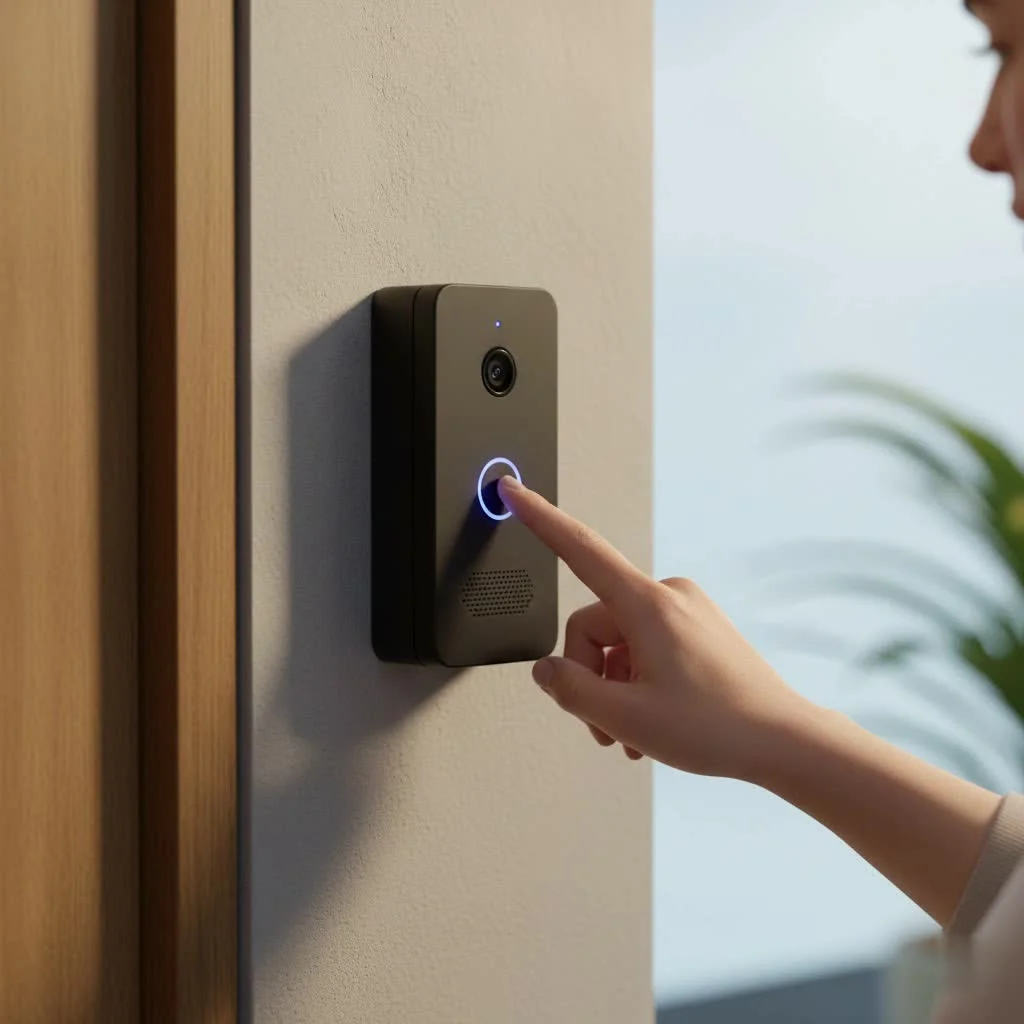
At its core, a smart doorbell is more than just a button; it’s a vigilant sentry that keeps you connected to your entryway, no matter where you are. These devices typically feature a camera, a microphone, and a speaker, allowing for two-way communication and video recording. Smart doorbells come in various forms – some are wired into existing doorbell circuits, offering continuous power, while others, like the Mubview, are entirely wireless and battery-powered, prized for their flexibility and ease of installation. They notify you when someone approaches or rings the bell, often sending alerts straight to your smartphone, and many integrate with broader smart home ecosystems for a truly connected experience.
Unpacking the Mubview Smart Video Doorbell: Key Features and Benefits
The Mubview Smart Video Doorbell isn’t just another gadget; it’s a meticulously designed piece of hardware that delivers substantial value. Here’s a closer look at what makes it stand out:
Crystal-Clear Vision: 2K HD Video and Dual Camera Advantage
Imagine seeing every detail, from a package label to a visitor’s expression, with striking clarity. The Mubview smart video doorbell boasts 2K HD resolution, ensuring that your video feed is sharp and vibrant, day or night. For those who want an even broader perspective, certain Mubview models offer an innovative dual-camera setup. This means you get two cameras working in tandem: one focused straight ahead for head-on views and another angled downwards to capture crucial details like packages left directly below the doorbell. This “head-to-toe” coverage is a major upgrade, especially for monitoring deliveries. And when the sun goes down, advanced infrared night vision takes over, providing clear footage even in complete darkness.
Security Without Subscriptions: Free Cloud & Local Storage
One of the most compelling aspects of the Mubview Smart Video Doorbell is its commitment to subscription-free security. Unlike many competitors that lock essential features or video history behind monthly paywalls, Mubview offers a generous 7-day free cloud loop recording. This means you can review recent events without opening your wallet. For those who prefer ultimate control or longer retention, the device also supports local storage via an SD card (sold separately), allowing you to keep recordings directly on the doorbell itself. This flexibility in storage options, combined with no mandatory recurring fees, makes Mubview an incredibly cost-effective choice for long-term home security.
Smart Alerts, Fewer False Alarms: Advanced Motion Detection
|
Our Picks for the Best Smart Doorbell in 2026
As an Amazon Associate I earn from qualifying purchases.
|
||
| Num | Product | Action |
|---|---|---|
| 1 | Tapo by TP-Link Smart Video Doorbell Camera with Chime, Battery or Wired, 2K QHD Color Night Vison, No Monthly Fee, 180° Ultra-Wide Head-to-Toe View, Ring Call, Free AI Detection, Local Storage (D225) |

|
| 2 | Google Nest Doorbell (Wired, 3rd Gen) - 2K Video and Gemini, Live View, Night Vision, 2-Way Audio - Works with Google Home - 2025 Model - Snow |
|
| 3 | ecobee Smart Video Doorbell Camera (Wired) - with Industry Leading HD Camera, Smart Security, Night Vision, Person and Package Sensors, 2-Way Talk, and Video & Snapshot Recording |
|
| 4 | Arlo Video Doorbell 2K (2nd Gen, Latest Release), Wireless or Wired Option, 2-Way Audio, Night Vision, Head to Toe Video View, Package Detection, Person & Vehicle Recognition, 1-Month Secure Plan |
|
| 5 | Anti-Theft Video Doorbell Mount Compatible with Arlo Video Doorbell/Blink Doorbell Camera, Anti-Blocks Motion Sensor, Adjustable Mounting Bracket Accessories for Houses/Apartments/Rentals-Silver |
|
| 6 | Tapo by TP-Link Smart Video Doorbell Camera Wireless with Chime, 2K with Full Color Night Vision & Spotlights, No Monthly Fee, Ring Call, 160° Ultra-Wide View, Free AI Detection, Local Storage,D210 |
|
| 7 | 1080p Smart Video Doorbell Camera with AI Motion Detection, Night Vision, Cloud Storage, 2 Way Audio, Battery Powered, 2.4GHz Wi-Fi Only |
|
| 8 | Google Nest Doorbell (Wired, 3rd Gen) - 2K Video and Gemini, Live View, Night Vision, 2-Way Audio - Works with Google Home - 2025 Model - Hazel |
|
| 9 | Tapo TP-Link Smart Video Doorbell Camera, Chime Included, 2K 5MP, Color Night Vision, 2-Way Audio, Free AI Detection, Cloud/SD Card Storage, Works w/Alexa & Google Home, D230S1 |
|
| 10 | 1080P Smart Wireless Video Doorbell Camera with AI Motion Detection, Night Vision, Two-Way Talk, Cloud Storage, Indoor/Outdoor Surveillance, Battery Powered, 2.4GHz Wi-Fi |
|
Nothing’s worse than constant, irrelevant alerts, whether it’s a car driving by or a tree swaying in the wind. The Mubview smart video doorbell addresses this with intelligent motion detection capabilities, combining PIR (Passive Infrared) sensors with advanced AI human detection. This sophisticated system is designed to distinguish between genuine human activity and minor disturbances, significantly reducing false alarms. You can further refine this by customizing motion zones within the app, telling the doorbell exactly where to focus its attention and what areas to ignore, ensuring you only get alerted to what truly matters at your doorstep.
Connect and Communicate: Two-Way Audio with a Twist
Effective communication is key to a truly functional smart doorbell. The Mubview system features clear two-way audio, allowing you to converse with visitors, delivery drivers, or even deter unwanted guests directly through your smartphone, no matter where you are. But here’s where Mubview adds a unique layer of privacy and security: a voice changer feature. Imagine being able to alter your voice to a deeper or higher pitch when speaking to someone at the door, adding an extra layer of anonymity and safety, especially for those living alone or when children answer the door remotely.
Effortless Installation and Robust Design: Wireless Freedom
Nobody wants a complicated installation process, and the Mubview Smart Video Doorbell shines here. Its wireless, battery-powered design means you won’t need to deal with existing doorbell wiring or hire an electrician. The robust built-in battery typically offers an impressive life of 2 to 6 months on a single charge, sometimes even up to 180 days depending on usage, minimizing the need for frequent recharging. Designed for the great outdoors, the doorbell boasts an IP65 weatherproof rating, ensuring it can withstand various weather conditions, from rain and snow to dust. Plus, a wireless indoor chime is usually included, so you’ll hear the doorbell ring inside your home even if your phone isn’t handy.
Getting Started: Installation and Configuration of Your Mubview Doorbell
Setting up your Mubview smart video doorbell is a straightforward process designed to get you up and running quickly. Here’s a detailed guide:
Before You Begin
- Full Charge: Before anything else, fully charge your Mubview smart video doorbell. The included Lithium-Ion battery needs a good charge to ensure optimal performance from the start.
- App Download: Download the “Mubview” app (or “CloudEdge” for some models) from your smartphone’s app store (iOS or Android). Register for an account if you don’t already have one.
- Wi-Fi Check: Ensure you have a stable 2.4GHz Wi-Fi network available where you plan to install the doorbell. Important: Mubview devices typically only support 2.4GHz Wi-Fi, not 5GHz.
Step-by-Step Installation
- Charge the Doorbell: Connect the doorbell to its charging cable (usually USB-C) and plug it into a power source until fully charged.
- Install Chime Batteries: If your chime requires them, insert 3 AAA batteries (often not included) into the indoor chime, ensuring correct polarity.
- Connect Doorbell to App:
- Open the Mubview app.
- Tap “Add Device” and select “Smart Video Doorbell.”
- Follow the in-app prompts, which will instruct you to press the doorbell button on the device to initiate pairing.
- Select your 2.4GHz Wi-Fi network and enter the password.
- The app will display a QR code. Hold your phone about 5-8 inches (15-25 cm) in front of the doorbell lens for the camera to scan it.
- You’ll hear a confirmation sound, and the doorbell indicator light will change, confirming a successful connection.
- Pair the Chime:
- Locate the “Setting Button” or “RESET” button on your indoor chime. Press it. The chime’s indicator light should flash red, indicating it’s in pairing mode for about 20 seconds.
- While the chime is flashing, press the button on your Mubview video doorbell.
- The chime will sound an alert, and its blue LED light will flash, confirming successful pairing. You can also adjust ringtones and volume in the chime settings.
- Mounting the Doorbell:
- Choose a Location: Select a suitable spot, typically at least 4 feet (120 cm) above the ground and slightly higher than the doorknob for an optimal viewing angle (around 120-145 degrees). Consider an adjustable angle bracket if needed.
- Install Mount: Use the provided mounting bracket, screws, and anchors (for stucco, brick, or concrete) to secure the bracket to your wall. For smooth surfaces, strong adhesive tape can sometimes be used.
- Attach Doorbell: Slide the Mubview unit into the mounting bracket.
- Secure: Use the small security screw at the bottom of the doorbell to prevent tampering. Many models also have a tamper detection button on the back that triggers an alarm if someone tries to remove it.
Mubview vs. The Giants: How Does it Compare?
When pitted against established players like Ring and Nest, the Mubview Smart Video Doorbell carves out its own niche, particularly for budget-conscious homeowners seeking essential features without compromise.
- Cost & Subscriptions: This is where Mubview truly shines. Its no-subscription model for basic features and a 7-day free cloud loop recording offers significant long-term savings compared to Ring and Nest, which typically require monthly or annual subscriptions for video history and advanced alerts.
- Connectivity: While Ring and Nest often offer more robust ecosystem integration (e.g., with Alexa or Google Home) and sometimes support 5GHz Wi-Fi or hardwired options for continuous power, Mubview focuses on simplicity with 2.4GHz Wi-Fi and a battery-powered design. This makes it easier to install but might require a Wi-Fi extender in larger homes.
- Features: Mubview holds its own with 2K HD video, advanced motion detection, and two-way audio. The dual-camera option and voice changer are unique selling points that even some premium brands don’t offer. While Ring and Nest might have more sophisticated AI (like specific package recognition or facial recognition in higher-tier models, often behind a paywall), Mubview provides reliable human detection to cover the core security needs effectively.
Troubleshooting Common Issues with Your Mubview Smart Video Doorbell
Even the most reliable tech can have a hiccup now and then. Here are solutions to common issues you might encounter:
- Connectivity Problems: If your Mubview Smart Video Doorbell fails to connect or frequently disconnects, first ensure it’s within range of your 2.4GHz Wi-Fi router. Double-check that your Wi-Fi password is correct. the device only supports 2.4GHz. Try restarting both the doorbell (often by holding the reset button for 5 seconds) and your router. Walls and other electronic devices can interfere with signals; try moving the doorbell closer or using a Wi-Fi extender.
- Chime Does Not Pair: Make sure the indoor chime is in pairing mode (red indicator light flashing). Confirm the doorbell itself is powered on and connected to the app. Try moving the chime closer to the doorbell during the pairing process, and ensure you firmly press the doorbell button to send the pairing signal. If issues persist, try restoring the chime to factory defaults (usually by holding its reset button for 5 seconds) and repeating the process.
- Motion Detection Not Working or Too Many Alerts: Access the doorbell’s settings in the Mubview app. Verify that motion detection is enabled. Adjust the sensitivity levels – “low” or “medium” settings often reduce false alarms. Customize motion zones to only monitor areas of interest. Ensure the camera is mounted at the recommended height (around 4 feet) and angle (10-15° downwards) for optimal detection performance.
- No Video History or SD Card Issues: If you’re not seeing recorded videos, first check if an SD card is correctly inserted into the doorbell and formatted within the app. If you’re relying on cloud storage, ensure your 7-day free trial (or any purchased subscription) is active and your Wi-Fi connection is strong enough for uploads. Sometimes, a poor Wi-Fi signal can prevent cloud recordings from syncing.
Conclusion
The Mubview Smart Video Doorbell stands as a testament that advanced home security doesn’t have to break the bank or come with a never-ending subscription. By offering clear 2K video, intelligent motion detection, versatile storage options, and even unique features like a voice changer, all within a wireless, easy-to-install package, Mubview presents a compelling solution for modern homeowners. It’s an accessible, feature-packed choice for anyone looking to enhance their home’s security and stay connected to their doorstep, day and night. If you’re ready to upgrade your home security without the hidden costs, the Mubview smart video doorbell is an investment that truly pays off, delivering peace of mind right to your smartphone. Explore the possibilities and take control of your home’s entryway today!
Frequently Asked Questions
Does the Mubview doorbell require a monthly subscription for features?
No, the Mubview Smart Video Doorbell does not require a subscription. It offers lifetime free basic cloud storage with a 7-day loop recording and supports local storage via an SD card, eliminating mandatory monthly fees.
What is the typical battery life of a Mubview smart video doorbell?
The built-in rechargeable battery in a Mubview smart video doorbell typically lasts between 2 to 6 months on a full charge. Some models can achieve up to 180 days, depending on usage frequency and environmental conditions.
Is the Mubview smart video doorbell compatible with 5GHz Wi-Fi networks?
No, Mubview smart video doorbells only support 2.4GHz Wi-Fi networks. Users should ensure their router is configured for 2.4GHz or has a dual-band option to ensure compatibility.
Can I use my existing wired mechanical chime with the Mubview doorbell?
No, the Mubview smart video doorbell is not designed to work with existing wired mechanical chimes. It comes with its own battery-powered wireless indoor chime for alerts.
Do Mubview smart video doorbells include a voice changer feature?
Yes, some Mubview smart video doorbell models feature a unique voice changer function. This allows users to alter their voice during two-way conversations for enhanced privacy and security.
Smart home that does not lock you in
Free PDF — protocol compatibility matrix for 30 hubs and devices.
I’ve tried a few smart doorbells, and the Mubview really stands out for its value. The intelligent motion detection is very accurate, cutting down on false alarms from passing cars. It’s a fantastic cost-effective alternative to those big-name brands that nickel and dime you with recurring fees. Highly recommend for anyone looking for hassle-free operation.
The Mubview doorbell is pretty good for the price, especially since it’s wireless and battery-powered. My main complaint is that sometimes the app takes a little longer than I’d like to connect when I get a motion alert. It’s not a deal-breaker, but it can be a bit frustrating when I want to see who’s there immediately.
This doorbell has been a solid upgrade. I appreciate the versatile storage options; I’m using a local SD card and it works perfectly for reviewing footage without any extra costs. The two-way communication is clear, and it’s great to be able to talk to delivery drivers when I’m not home. Definitely enhances my home protection.
I was really tired of paying monthly fees for my old doorbell camera, so the Mubview Smart Video Doorbell being subscription-free was a huge selling point for me. The 2K HD video is super clear, even at night, and the motion detection is spot on. Installation was a breeze too, which is always a plus for someone not super tech-savvy.